Licensing
Sensible Laps is licensed per machine. Your licence controls whether the app is activated, when it expires, and which features are unlocked. Everything to do with licensing lives in one place: Menu ▸ Tools ▸ License….
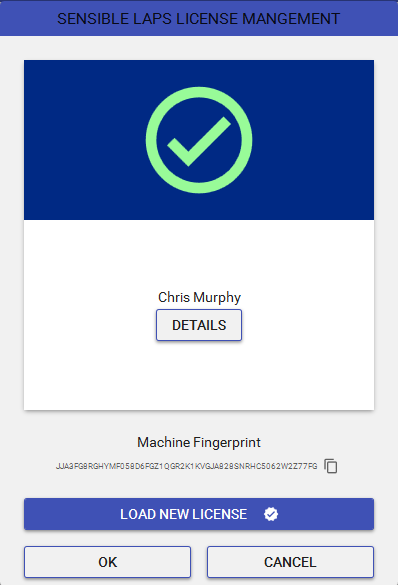
The License window
The window shows the current licence at a glance — a green tick if it's valid, a red error if it isn't — and flips over to DETAILS for the specifics:
| Field | Meaning |
|---|---|
| Name / Email | Who the licence was issued to. |
| Type | Trial (time-limited, any machine) or Standard (tied to this machine). |
| Expiry | The date the licence stops being valid. |
| Features | Which products are unlocked — see below. |
Below the card sits your Machine Fingerprint and a copy button. The fingerprint is derived from this PC's hardware; a Standard licence is locked to it, so a Standard licence issued for one machine won't validate on another.
Features
A single licence can unlock any combination of:
- Sensible Laps — the timing application itself.
- Sensible Championship — the companion championship/series scoring app.
- Live Timing — publishing timing to the internet (Live Publish Settings).
- Results — uploading finished results to results.sensiblelaps.com (Export Results).
If a feature's checkbox is unticked, that feature isn't included in your licence.
How activation works
It happens automatically when you're online
Each time Sensible Laps starts it checks in with the licence server using this machine's fingerprint. If the server has a valid licence for the machine, the local licence file is downloaded and refreshed automatically — so renewals and new purchases are picked up just by launching the app while connected to the internet.
A Trial licence that hasn't expired is left in place even when offline, so you can evaluate the app without a connection.
Activating offline
If the timing PC can't reach the internet, use LOAD NEW LICENSE to point the app at a licence file supplied by sales — it overwrites the existing licence in place. This is the manual path when dial-home isn't an option.
When the licence is invalid
If validation fails (expired, wrong machine, or missing), the app reports why and how to resolve it. The usual fixes, in order:
- Connect to the internet and restart — this re-runs the automatic check and pulls down a current licence.
- Load a licence file manually via LOAD NEW LICENSE.
- Contact sales@sensiblelaps.com to renew or purchase — quote the Machine Fingerprint (use the copy button) so the new licence is issued for the right PC.
New PC or new hardware?
Because a Standard licence is bound to the machine fingerprint, replacing the timing PC (or major hardware) means the fingerprint changes. Copy the new fingerprint from this window and send it to sales to have your licence re-issued.