Event Accounting
The Event Accounting tab manages entrant payments. Entry fees are saved per event, with defaults for new events set in Accounting.
Fees can be viewed for the current event or the current practice session — switch between them with the drop-down at the top.
- Practice selected:

- Current event selected:

Modify the fees available for the event with  , and
add a new entry with
, and
add a new entry with  .
.
Per-entry quick actions:
 Mark as paid
 Edit entry
 Remove the entry from a division
Removing a contestant's last or only division entry removes them from the event.
The Add/Edit entry popup:
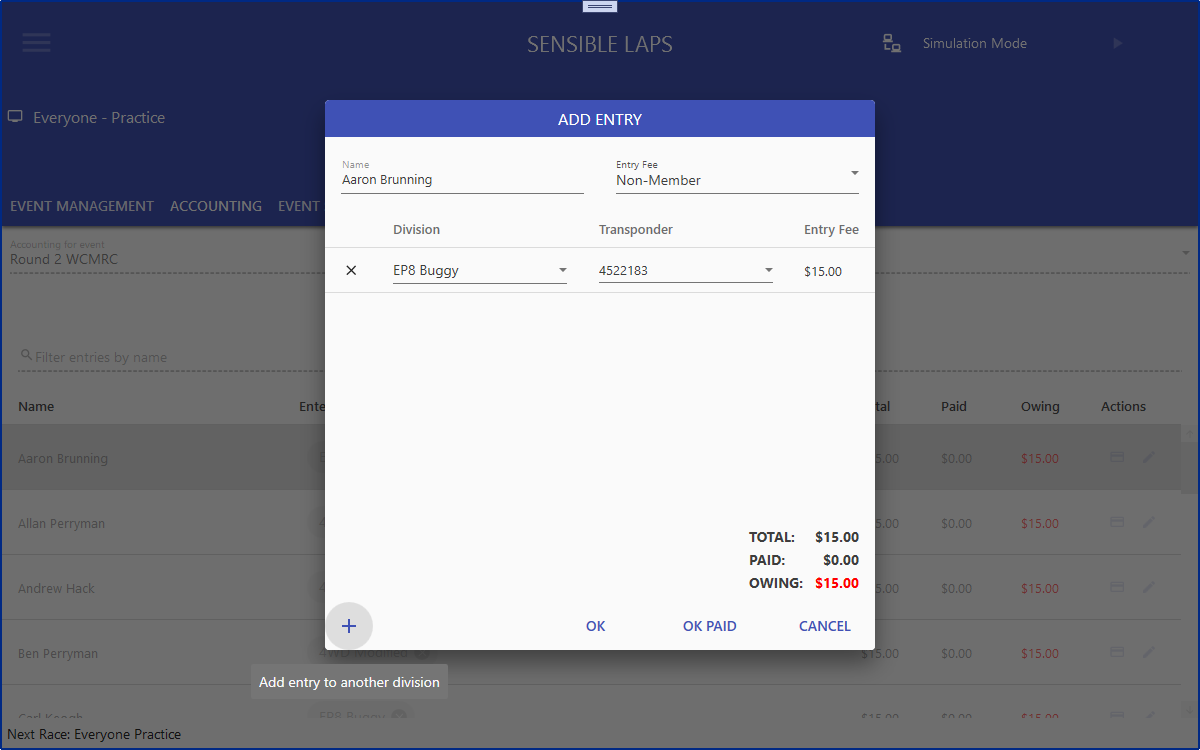
An entry is made with the selected entry fee. If that fee is a system default and
differs from the one stored for the contestant, you're asked whether to update
the contestant's stored fee. Add an additional division with
 , or remove an entry with
 . Entries can be added as paid or still
owing.
. Entries can be added as paid or still
owing.